---
title: Understanding The Filter Tool (Suppliers)
description: Suppliers can utilize the Filter Tool to pinpoint the data that's important to them
---
[Skip to content](https://support.beerboard.com/knowledge/supplierfilter#main-content)
English
Show submenu for translations

Open main navigation
Close main navigation
- English
Show submenu for translations
- [Contact us](https://share.hsforms.com/1b6jKgzmvTI-oms75xoTasw3vlv9)
[Contact us](https://share.hsforms.com/1b6jKgzmvTI-oms75xoTasw3vlv9)
How can we help you?
- There are no suggestions because the search field is empty.
1. [BeerBoard Knowledge Base](https://support.beerboard.com/knowledge?hsLang=en)
2. [Suppliers, Distributors, and Wholesalers](https://support.beerboard.com/knowledge/suppliers-distributors-and-wholesalers?hsLang=en)
3. [General FAQ](https://support.beerboard.com/knowledge/suppliers-distributors-and-wholesalers?hsLang=en#general-faq)
# Understanding The Filter Tool (Suppliers)
## Suppliers can utilize the Filter Tool to pinpoint the data that's important to them
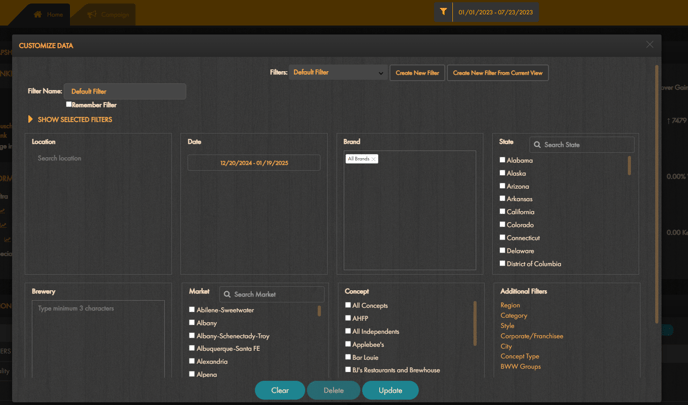
The filter tool on the SmartBar Supplier Platform is an essential feature to help users pinpoint the exact data points they care about. By selecting options such as Region, Location, Date Range, Brand, State, Brewery, Designated Market Area, Concept, and additional filters like Category, Style, Corporate/Franchisee, City, or Concept Type, users can tailor their data views. These selections dynamically update various widgets, including Tap Distribution (by customer or concept), Tap Change Feed, Categories, Styles, and more.
#### Accessing the Filter Tool
1. **Sign in** to the SmartBar Supplier Platform.
2. Click the **funnel icon** to open the filter window.
#### Filter Settings
Within the filter window, users can configure settings for:
- **Region**
- **Location**
- **Date Range**
- **Brand**
- **State**
- **Brewery**
- **Market**: Includes Designated Market Area
- **Concept**
- **Additional Filters**:
- Category
- Style
- Corporate/Franchisee
- City
- Concept Type
After making selections, users can:
- **Click Update** to reload the platform with their chosen filters.
- **Click Clear** to reset the filter window.
- **Click Delete** to remove a saved filter.
#### Designated Market Area (DMA)
Similar to Nielsen's DMA, BeerBoard has created a comprehensive list of market areas that can help suppliers get the specifics they need.
> The above map does not represent a 1:1 of our DMA but is very close to our current market standards. US television market map (DMA) created by [Amir Gnyawali](https://public.tableau.com/app/profile/amirgnyawali)
The DMA filter offers flexible filtering options to help you refine your search. Here’s how it works:
- **Dynamic Filtering by State**: You can first filter by a specific state, and the DMA filter will automatically update to display only the DMAs within that state. This allows for a more targeted search based on location.
- **Independent DMA Filtering**: If you prefer, you can use the DMA filter on its own without first selecting a state. This means you can directly filter by a specific DMA without any prior state selection.
These features provide you with the flexibility to tailor your search based on your needs, whether you want to narrow down by state or focus on a particular DMA directly.
Available from the Dashboard and within Enhanced Insights
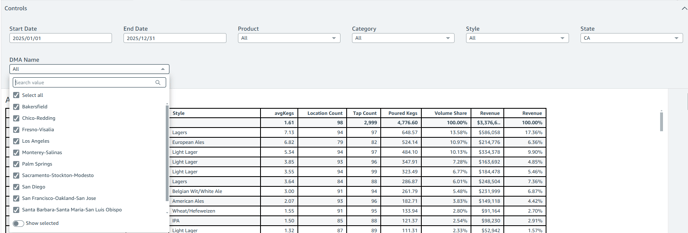
Within the filter window, go to the **Market** section and make your selection(s). Once done, click **Update** at the bottom, and the platform will load the corresponding data points.
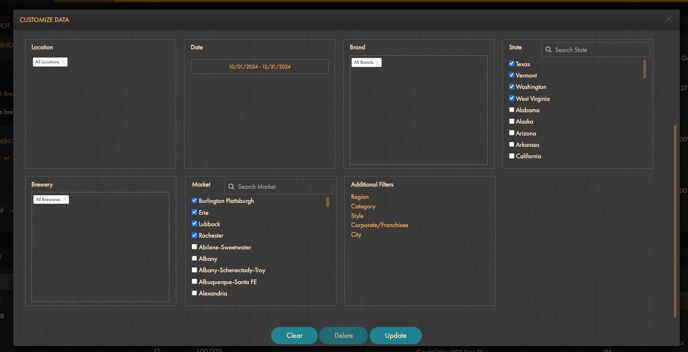
> ***Due to our database structure, states are listed before market names in alphabetical order. Currently, we cannot add the state at the end of the market name and sort it alphabetically that way.***
### Managing Filters: Saving and Editing Filters
At the top of the filter window, users can use the dropdown to select an existing filter or create a new one:
- **Create New Filter**:
- - Opens a blank filter window for users to define new selections.
- After setting preferences, click **Save** to finalize.
- A name must be entered in the name field for it to save properly
- **Create New Filter From Current View**:
- Uses the current filter selections as a base for a new filter.
- Enter a name for the filter and click **Save**.
#### Deleting Filters
To delete an existing filter:
- Select the filters from the dropdown menu.
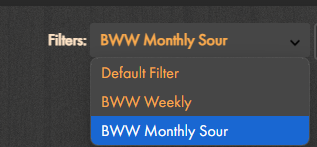
- Click **Delete** to remove it permanently.
### Tips for Efficient Filtering
- Combine multiple filters to narrow down specific data points.
- Save frequently used filters for quick access in future sessions.
- Regularly review saved filters to ensure relevance to current needs.
By leveraging the SmartBar Supplier Platform’s filter tool, users can efficiently access and analyze the data most relevant to their operations.
- [Bars and Restaurants](https://support.beerboard.com/knowledge/bars-and-restaurants?hsLang=en#main-content)
- [SmartBar](https://support.beerboard.com/knowledge/bars-and-restaurants?hsLang=en#smartbar)
- [Product Management](https://support.beerboard.com/knowledge/bars-and-restaurants?hsLang=en#product-management)
- [Yield Management](https://support.beerboard.com/knowledge/bars-and-restaurants?hsLang=en#yield-management)
- [BeerBoard TV](https://support.beerboard.com/knowledge/bars-and-restaurants?hsLang=en#beerboard-tv)
- [SmartBar Mobile App](https://support.beerboard.com/knowledge/bars-and-restaurants?hsLang=en#smartbar-mobile-app)
- [BeerBoard P@Y](https://support.beerboard.com/knowledge/bars-and-restaurants?hsLang=en#beerboard-py)
- [SmartMenus](https://support.beerboard.com/knowledge/bars-and-restaurants?hsLang=en#smartmenus)
- [SmartOrders](https://support.beerboard.com/knowledge/bars-and-restaurants?hsLang=en#smartorders)
- [Integrations Setup](https://support.beerboard.com/knowledge/bars-and-restaurants?hsLang=en#integrations-setup)
- [New SmartBar](https://support.beerboard.com/knowledge/bars-and-restaurants?hsLang=en#new-smartbar)
- [BevBox](https://support.beerboard.com/knowledge/bars-and-restaurants?hsLang=en#bevbox)
- [Beer Tour](https://support.beerboard.com/knowledge/bars-and-restaurants?hsLang=en#beer-tour)
- [General FAQs](https://support.beerboard.com/knowledge/general-faqs?hsLang=en#main-content)
- [SmartBar](https://support.beerboard.com/knowledge/general-faqs?hsLang=en#smartbar)
- [SmartOrders](https://support.beerboard.com/knowledge/general-faqs?hsLang=en#smartorders)
- [Claim Your Brand](https://support.beerboard.com/knowledge/claim-your-brand?hsLang=en#main-content)
- [Distributors, Wholesalers, and Suppliers](https://support.beerboard.com/knowledge/claim-your-brand?hsLang=en#distributors-wholesalers-and-suppliers)
- [Claim Your Brand FAQs](https://support.beerboard.com/knowledge/claim-your-brand?hsLang=en#claim-your-brand-faqs)
- [Suppliers, Distributors, and Wholesalers](https://support.beerboard.com/knowledge/suppliers-distributors-and-wholesalers?hsLang=en#main-content)
- [SmartOrders](https://support.beerboard.com/knowledge/suppliers-distributors-and-wholesalers?hsLang=en#smartorders)
- [Insights](https://support.beerboard.com/knowledge/suppliers-distributors-and-wholesalers?hsLang=en#insights)
- [General FAQ](https://support.beerboard.com/knowledge/suppliers-distributors-and-wholesalers?hsLang=en#general-faq)
- [BeerBoard P@Y](https://support.beerboard.com/knowledge/suppliers-distributors-and-wholesalers?hsLang=en#beerboard-py)
[](https://www.beerboard.com/)
225 W Jefferson St, Syracuse, NY 13202
Copyright © 2025, BeerBoard