---
title: V4 BevBox Line Cleaning Mode
description: Learn how to manually initiate and exit Line Cleaning mode on BevBox v4 when the SmartBar feature is unresponsive, including step-by-step guidance and important usage notes.
---
[Skip to content](https://support.beerboard.com/knowledge/v4-bevbox-line-cleaning-mode#main-content)
English
Show submenu for translations

Open main navigation
Close main navigation
- English
Show submenu for translations
- [Contact us](https://share.hsforms.com/1b6jKgzmvTI-oms75xoTasw3vlv9)
[Contact us](https://share.hsforms.com/1b6jKgzmvTI-oms75xoTasw3vlv9)
How can we help you?
- There are no suggestions because the search field is empty.
1. [BeerBoard Knowledge Base](https://support.beerboard.com/knowledge?hsLang=en)
2. [Bars and Restaurants](https://support.beerboard.com/knowledge/bars-and-restaurants?hsLang=en)
3. [BevBox](https://support.beerboard.com/knowledge/bars-and-restaurants?hsLang=en#bevbox)
# V4 BevBox Line Cleaning Mode
## If the Line Cleaning feature in SmartBar isn’t working and your BevBox is a v4, follow these steps to initiate Line Cleaning directly from the BevBox.
**Initiating Line Cleaning from BevBox (v4):**
**It is strongly recommended to utilize the Line Cleaning button on SmartBar before using this method. Issues with the LC button should be sent to Support immediately.**
- Press enter to prompt the Line Clean mode
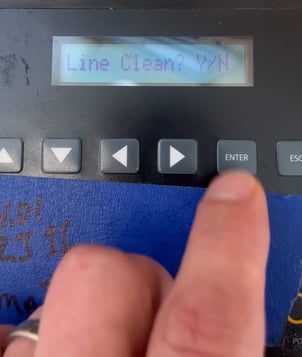
- Press the **Enter** key again.
- When prompted for a PIN code, use the arrow keys to enter **1-2-1**.
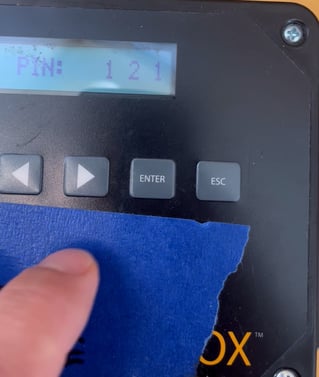
- Press the **Enter** key again to activate Line Cleaning mode.
- Once cleaning is complete, exit Line Cleaning mode, by pressing the **ESC** key.
> **Important:** You must manually exit Line Cleaning mode by pressing ESC, as there is no automatic timeout or duration setting.
- [Bars and Restaurants](https://support.beerboard.com/knowledge/bars-and-restaurants?hsLang=en#main-content)
- [SmartBar](https://support.beerboard.com/knowledge/bars-and-restaurants?hsLang=en#smartbar)
- [Product Management](https://support.beerboard.com/knowledge/bars-and-restaurants?hsLang=en#product-management)
- [Yield Management](https://support.beerboard.com/knowledge/bars-and-restaurants?hsLang=en#yield-management)
- [BeerBoard TV](https://support.beerboard.com/knowledge/bars-and-restaurants?hsLang=en#beerboard-tv)
- [SmartBar Mobile App](https://support.beerboard.com/knowledge/bars-and-restaurants?hsLang=en#smartbar-mobile-app)
- [BeerBoard P@Y](https://support.beerboard.com/knowledge/bars-and-restaurants?hsLang=en#beerboard-py)
- [SmartMenus](https://support.beerboard.com/knowledge/bars-and-restaurants?hsLang=en#smartmenus)
- [SmartOrders](https://support.beerboard.com/knowledge/bars-and-restaurants?hsLang=en#smartorders)
- [Integrations Setup](https://support.beerboard.com/knowledge/bars-and-restaurants?hsLang=en#integrations-setup)
- [New SmartBar](https://support.beerboard.com/knowledge/bars-and-restaurants?hsLang=en#new-smartbar)
- [BevBox](https://support.beerboard.com/knowledge/bars-and-restaurants?hsLang=en#bevbox)
- [Beer Tour](https://support.beerboard.com/knowledge/bars-and-restaurants?hsLang=en#beer-tour)
- [General FAQs](https://support.beerboard.com/knowledge/general-faqs?hsLang=en#main-content)
- [SmartBar](https://support.beerboard.com/knowledge/general-faqs?hsLang=en#smartbar)
- [SmartOrders](https://support.beerboard.com/knowledge/general-faqs?hsLang=en#smartorders)
- [Claim Your Brand](https://support.beerboard.com/knowledge/claim-your-brand?hsLang=en#main-content)
- [Distributors, Wholesalers, and Suppliers](https://support.beerboard.com/knowledge/claim-your-brand?hsLang=en#distributors-wholesalers-and-suppliers)
- [Claim Your Brand FAQs](https://support.beerboard.com/knowledge/claim-your-brand?hsLang=en#claim-your-brand-faqs)
- [Suppliers, Distributors, and Wholesalers](https://support.beerboard.com/knowledge/suppliers-distributors-and-wholesalers?hsLang=en#main-content)
- [SmartOrders](https://support.beerboard.com/knowledge/suppliers-distributors-and-wholesalers?hsLang=en#smartorders)
- [Insights](https://support.beerboard.com/knowledge/suppliers-distributors-and-wholesalers?hsLang=en#insights)
- [General FAQ](https://support.beerboard.com/knowledge/suppliers-distributors-and-wholesalers?hsLang=en#general-faq)
- [BeerBoard P@Y](https://support.beerboard.com/knowledge/suppliers-distributors-and-wholesalers?hsLang=en#beerboard-py)
[](https://www.beerboard.com/)
225 W Jefferson St, Syracuse, NY 13202
Copyright © 2025, BeerBoard