---
title: Show On Menu Function
description: Show and hide products on Print Menu, BeerBoard TV, and SmartMenus
---
[Skip to content](https://support.beerboard.com/knowledge/show-on-menu#main-content)
English
Show submenu for translations

Open main navigation
Close main navigation
- English
Show submenu for translations
- [Contact us](https://share.hsforms.com/1b6jKgzmvTI-oms75xoTasw3vlv9)
[Contact us](https://share.hsforms.com/1b6jKgzmvTI-oms75xoTasw3vlv9)
How can we help you?
- There are no suggestions because the search field is empty.
1. [BeerBoard Knowledge Base](https://support.beerboard.com/knowledge?hsLang=en)
2. [Bars and Restaurants](https://support.beerboard.com/knowledge/bars-and-restaurants?hsLang=en)
3. [Product Management](https://support.beerboard.com/knowledge/bars-and-restaurants?hsLang=en#product-management)
# Show On Menu Function
## Show and hide products on Print Menu, BeerBoard TV, and SmartMenus
Show On Menus is used to identify what brands need to appear on the Print Menu, BeerBoard TV and SmartMenus. During the Covid-19 reopening phase, this feature was used to exclude brands that were not available for a variety of reasons and to assure an accurate print menu.
### How to use Show On Menu for Draft Beer
- From the [Product Management](https://support.beerboard.com/knowledge/what-is-plu/product-management?hsLang=en) section, click any draft beer that is on the Current or Upcoming Draft lists
- **To show the product** on your next Print cycle or BeerBoard TV menu, click the **Show On Menus** -png.png)
- Gold band indicates the product is now visible for Print menu and BeerBoard TV
- **To hide the product** from the next Print cycle or BeerBoard TV menu visibility, click **Show On Menus**
- Gray band indicates the product is hidden from Print menu and BeerBoard TV-png.png)
- Click the X in the upper right-hand corner to close this menu
- In the [Product Management](https://support.beerboard.com/knowledge/what-is-plu/product-management?hsLang=en) section, the product selected to Show on Menu will have a RED numbered DOT above the tap handle
-png.png?width=133&height=359&name=Screenshot%20(749)-png.png)
- If the numbered dot is GRAY, the product is hidden from Print menu and BeerBoard TV
-png.png?width=128&height=342&name=Screenshot%20(751)-png.png)
### How to use Show On Menu for Bottled Beer
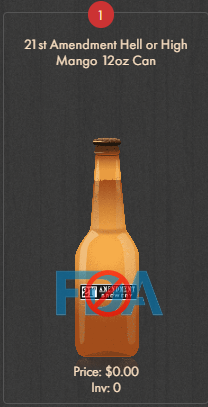
- From the [Product Management](https://support.beerboard.com/knowledge/what-is-plu/product-management?hsLang=en) section, click on the drop-down that says current draft List and select Bottles and Cans.
- Click on the Bottle or Can you would like to update
- Then toggle Show On Menus on or off.
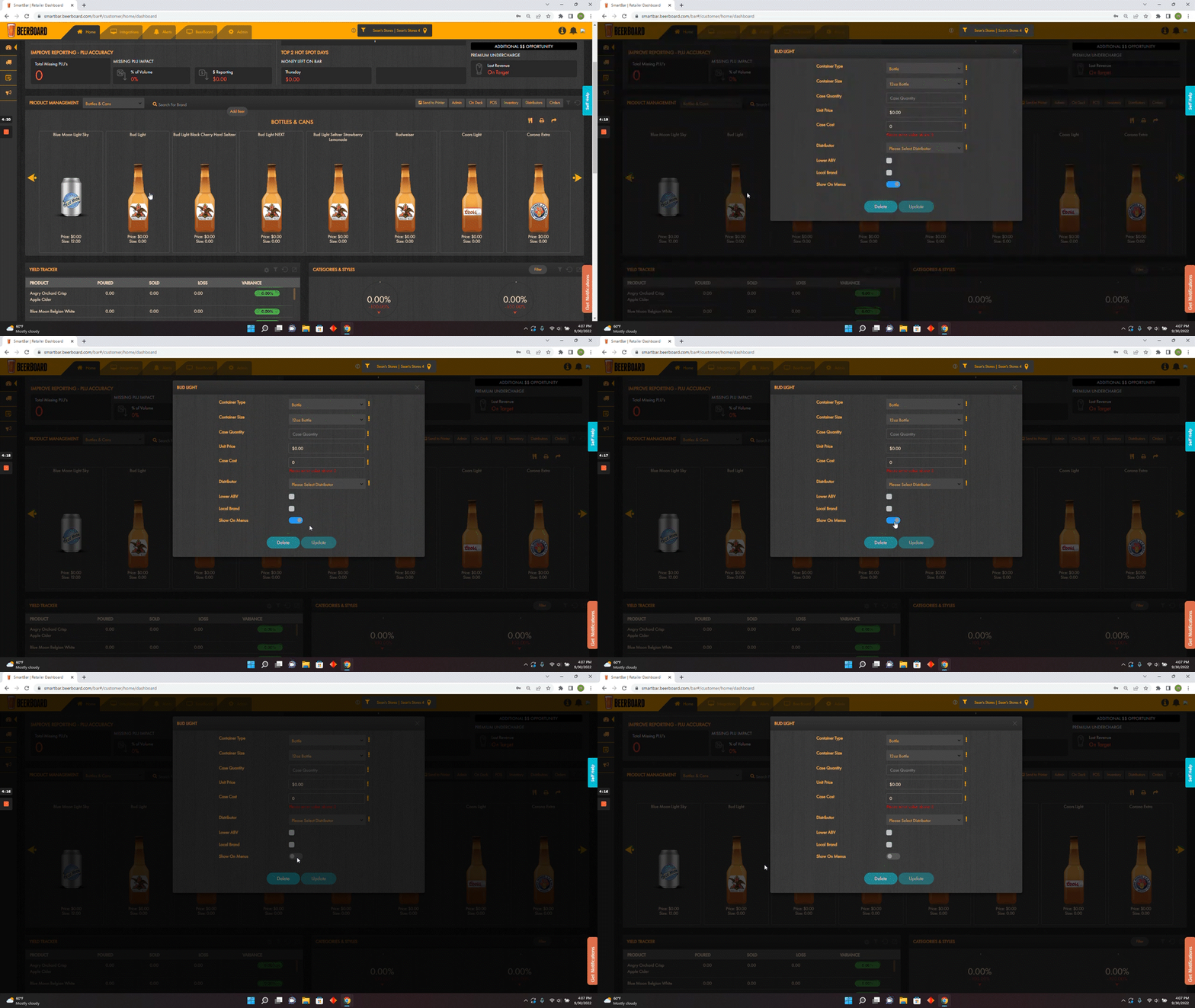
- In the [Product Management](https://support.beerboard.com/knowledge/what-is-plu/product-management?hsLang=en) section, the product selected to Show on Menu will have a RED numbered DOT above the bottle or can beer
### How to use Show On Menu for Food
- First, navigate to SmartMenu by clicking the Food Menu Management section of SmartBar on the left.
- 
- Under the Price Tiers tab, there is a Show On Menu column to the right. From there you will have the ability to toggle off the specific item by clicking on the box
- In order to turn the item back on, You will need to go to the upper left-hand corner and use the Show On Menu dropdown to select No.
- 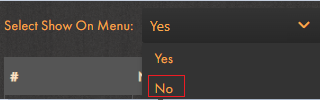
- Find the product you want to be turned on and click on the box in the Show On Menu column.
- [Bars and Restaurants](https://support.beerboard.com/knowledge/bars-and-restaurants?hsLang=en#main-content)
- [SmartBar](https://support.beerboard.com/knowledge/bars-and-restaurants?hsLang=en#smartbar)
- [Product Management](https://support.beerboard.com/knowledge/bars-and-restaurants?hsLang=en#product-management)
- [Yield Management](https://support.beerboard.com/knowledge/bars-and-restaurants?hsLang=en#yield-management)
- [BeerBoard TV](https://support.beerboard.com/knowledge/bars-and-restaurants?hsLang=en#beerboard-tv)
- [SmartBar Mobile App](https://support.beerboard.com/knowledge/bars-and-restaurants?hsLang=en#smartbar-mobile-app)
- [BeerBoard P@Y](https://support.beerboard.com/knowledge/bars-and-restaurants?hsLang=en#beerboard-py)
- [SmartMenus](https://support.beerboard.com/knowledge/bars-and-restaurants?hsLang=en#smartmenus)
- [SmartOrders](https://support.beerboard.com/knowledge/bars-and-restaurants?hsLang=en#smartorders)
- [Integrations Setup](https://support.beerboard.com/knowledge/bars-and-restaurants?hsLang=en#integrations-setup)
- [New SmartBar](https://support.beerboard.com/knowledge/bars-and-restaurants?hsLang=en#new-smartbar)
- [BevBox](https://support.beerboard.com/knowledge/bars-and-restaurants?hsLang=en#bevbox)
- [Beer Tour](https://support.beerboard.com/knowledge/bars-and-restaurants?hsLang=en#beer-tour)
- [General FAQs](https://support.beerboard.com/knowledge/general-faqs?hsLang=en#main-content)
- [SmartBar](https://support.beerboard.com/knowledge/general-faqs?hsLang=en#smartbar)
- [SmartOrders](https://support.beerboard.com/knowledge/general-faqs?hsLang=en#smartorders)
- [Claim Your Brand](https://support.beerboard.com/knowledge/claim-your-brand?hsLang=en#main-content)
- [Distributors, Wholesalers, and Suppliers](https://support.beerboard.com/knowledge/claim-your-brand?hsLang=en#distributors-wholesalers-and-suppliers)
- [Claim Your Brand FAQs](https://support.beerboard.com/knowledge/claim-your-brand?hsLang=en#claim-your-brand-faqs)
- [Suppliers, Distributors, and Wholesalers](https://support.beerboard.com/knowledge/suppliers-distributors-and-wholesalers?hsLang=en#main-content)
- [SmartOrders](https://support.beerboard.com/knowledge/suppliers-distributors-and-wholesalers?hsLang=en#smartorders)
- [Insights](https://support.beerboard.com/knowledge/suppliers-distributors-and-wholesalers?hsLang=en#insights)
- [General FAQ](https://support.beerboard.com/knowledge/suppliers-distributors-and-wholesalers?hsLang=en#general-faq)
- [BeerBoard P@Y](https://support.beerboard.com/knowledge/suppliers-distributors-and-wholesalers?hsLang=en#beerboard-py)
[](https://www.beerboard.com/)
225 W Jefferson St, Syracuse, NY 13202
Copyright © 2025, BeerBoard
```json
{
"@context" : "https://schema.org",
"@type" : "VideoObject",
"contentUrl" : "https://6513525.fs1.hubspotusercontent-na1.net/hubfs/6513525/Show%20On%20Menu%20Function-enhanced-70p.mp4",
"dateModified" : "2024-02-19T19:48:10.047Z",
"duration" : "PT1M53S",
"height" : 720,
"name" : "Show On Menu Function-enhanced-70p",
"thumbnailUrl" : "https://6513525.fs1.hubspotusercontent-na1.net/hubfs/6513525/Show%20On%20Menu%20Function-enhanced-70p.mp4/medium.jpg",
"uploadDate" : "2024-02-19T19:47:58.184Z",
"width" : 1280
}
```