---
title: Product Management - Draft, Package, Liquor, & Wine
description: Users can now select from all alcohol categories from the SmartBar Dashboard - Product Category Dropdown
---
[Skip to content](https://support.beerboard.com/knowledge/product-category-dropdown-0#main-content)
English
Show submenu for translations

Open main navigation
Close main navigation
- English
Show submenu for translations
- [Contact us](https://share.hsforms.com/1b6jKgzmvTI-oms75xoTasw3vlv9)
[Contact us](https://share.hsforms.com/1b6jKgzmvTI-oms75xoTasw3vlv9)
How can we help you?
- There are no suggestions because the search field is empty.
1. [BeerBoard Knowledge Base](https://support.beerboard.com/knowledge?hsLang=en)
2. [Bars and Restaurants](https://support.beerboard.com/knowledge/bars-and-restaurants?hsLang=en)
3. [Product Management](https://support.beerboard.com/knowledge/bars-and-restaurants?hsLang=en#product-management)
# Product Management - Draft, Package, Liquor, & Wine
## Select from all alcohol categories from the SmartBar Dashboard - Product Category Dropdown
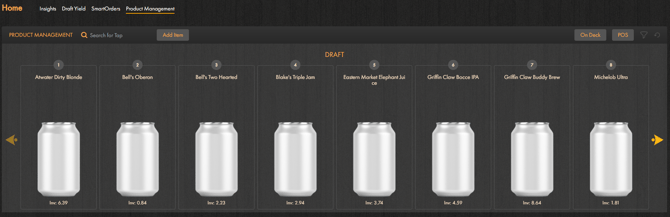
After signing in, click on Product Management. On the Product Management page, use the product category dropdown and choose between Draft, Package(bottles & cans), Liquor and Wine. By selecting one of these product categories, users can view their inventory and make individual product adjustments.
### Draft
Specific to the Draft category, the [Product Management Widget](https://support.beerboard.com/knowledge/product-management-section?hsLang=en)will have an additional drop-down for Current Draft and Upcoming Draft List. Some users may not have the upcoming draft list but access to [On Deck](https://support.beerboard.com/knowledge/on-deck?hsLang=en) instead.
#### **Current Draft List**:
Current drafts on tap (listed from left to right as they are behind the bar)
-png.png?width=670&height=221&name=Screenshot%20(505)-png.png)
Data from the Current Draft list affects:
- BeerBoard TV - establishing displayed products
- [Yield tracker](https://support.beerboard.com/knowledge/yield-tracker?hsLang=en) - metered line data
- [Print menus](https://support.beerboard.com/knowledge/print-menu?hsLang=en) - draft line up reflected in menu
> ### It is imperative to maintain your current draft list and ensure that products shown left to right are identical to what is at your bar, left to right.
#### **Upcoming Draft List:**
The Upcoming draft list is where the future lineup of beers is initiated and for those that apply, print menus
-png.png?width=670&height=226&name=Screenshot%20(506)-png.png)
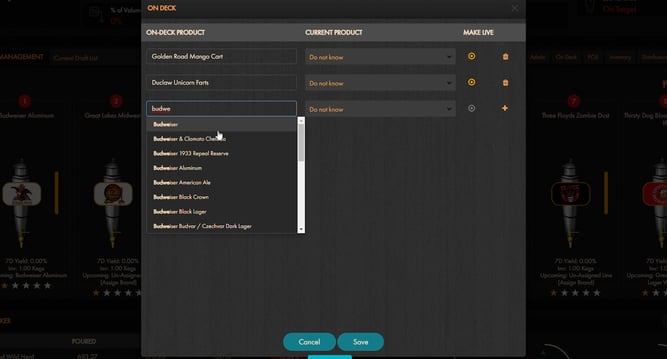
#### Alternative: [On Deck](https://support.beerboard.com/knowledge/on-deck?hsLang=en)
On Deck allows user to "load" their draft line up before making a brand live and "launch" into a draft line.
### Package
Users will see their bottled and canned products in alphabetical order by selecting Package.
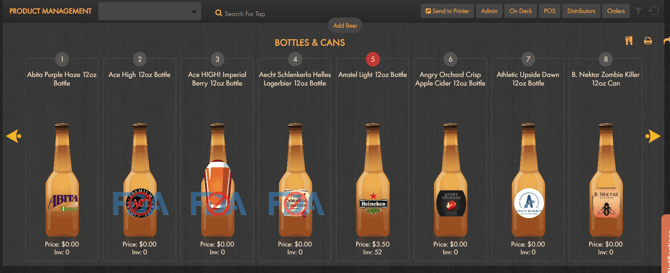
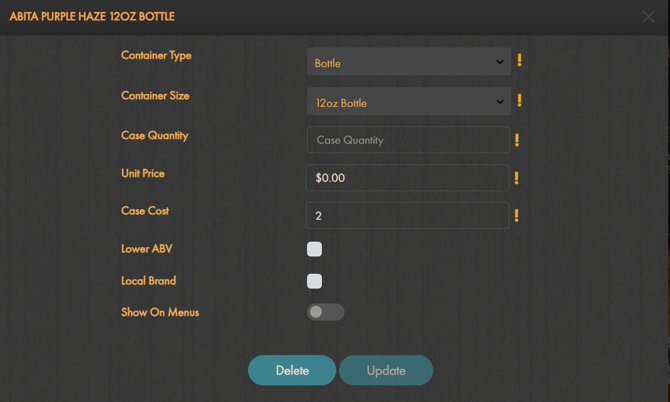
Click on a bottle or can product to bring up its product details. Here you can edit:
- Container Type
- Container Size
- Case Quantity
- Unit Price
- Case Cost
- Mark if . . .
- Lower ABV
- Local Brand
- [Show On Menus](https://support.beerboard.com/knowledge/show-on-menu?hsLang=en)
[Add or Remove Beer](https://support.beerboard.com/knowledge/bottles-cans?hsLang=en)
### Liquor
Users will see their liquor products in alphabetical order by selecting Liquor.
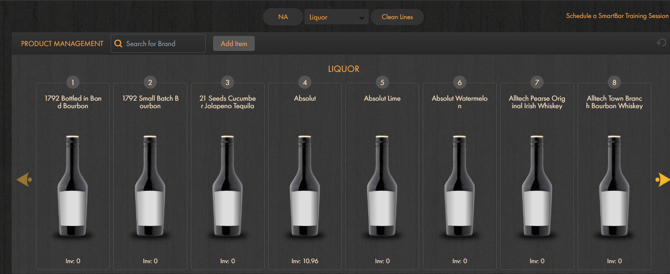
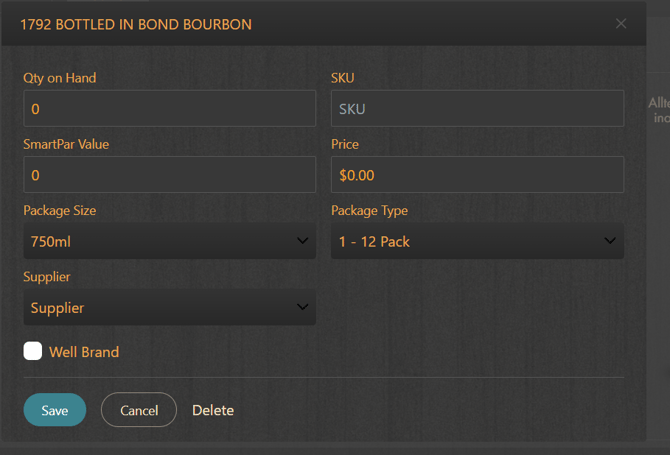
Click on the product to bring up its product details. Here you can edit the
- Quantity on hand
- SmartPar Value
- Package Size
- Supplies
- SKU
- Price
- Package Type
- Mark if Well Brand
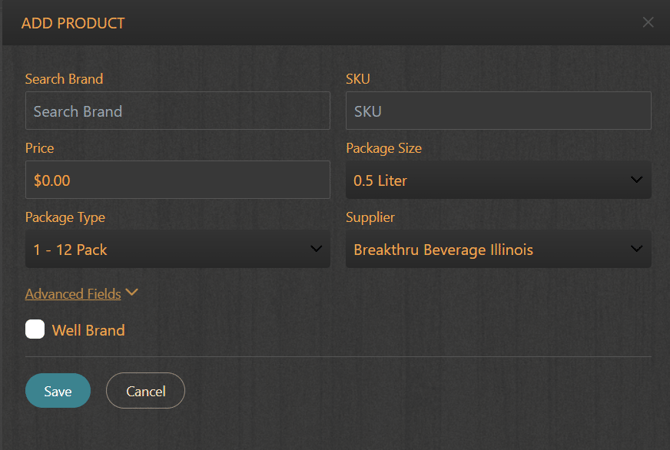
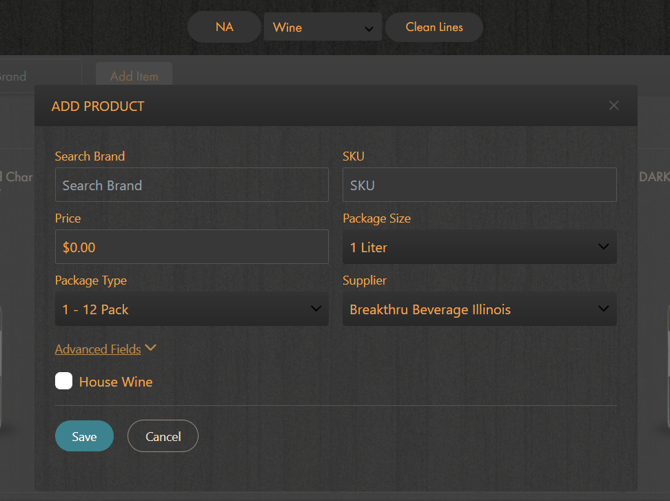
Use the **Add Item** button to add a new product.
### Wine
Users will see their wine products in alphabetical order by selecting Wine.
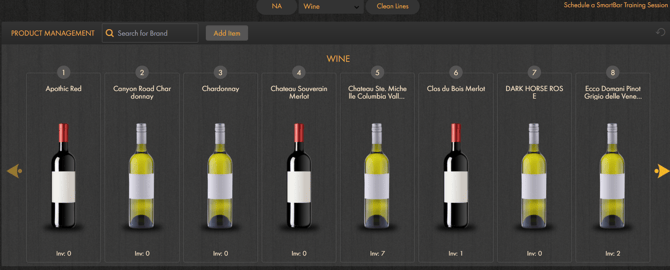
Click on the product to bring up its product details. Here you can edit the
- Quantity on hand
- SmartPar Value
- Package Size
- Supplier
- important to provide when ordering to ensure orders are processed
- SKU
- Price
- Package Type
- Mark if House Wine
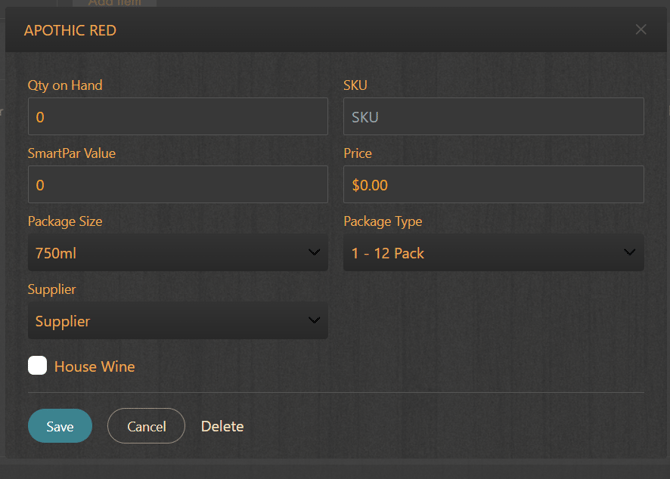
Use the **Add Item** button to add a new product.
### SmartBar Mobile
As users can choose on desktop, the same functionality is available on SmartBar Mobile.
**Draft**
-png.png?width=252&height=550&name=Screenshot%20(561)-png.png)
**Package**
-png.png?width=252&height=551&name=Screenshot%20(562)-png.png)
**Liquor**
-png.png?width=222&height=480&name=Screenshot%20(563)-png.png) -png.png?width=222&height=485&name=Screenshot%20(565)-png.png)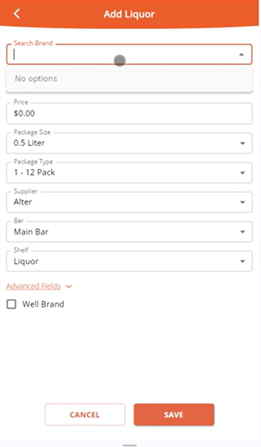
**Wine**
-png-1.png?width=248&height=548&name=Screenshot%20(564)-png-1.png) -png.png?width=251&height=550&name=Screenshot%20(566)-png.png)
- [Bars and Restaurants](https://support.beerboard.com/knowledge/bars-and-restaurants?hsLang=en#main-content)
- [SmartBar](https://support.beerboard.com/knowledge/bars-and-restaurants?hsLang=en#smartbar)
- [Product Management](https://support.beerboard.com/knowledge/bars-and-restaurants?hsLang=en#product-management)
- [Yield Management](https://support.beerboard.com/knowledge/bars-and-restaurants?hsLang=en#yield-management)
- [BeerBoard TV](https://support.beerboard.com/knowledge/bars-and-restaurants?hsLang=en#beerboard-tv)
- [SmartBar Mobile App](https://support.beerboard.com/knowledge/bars-and-restaurants?hsLang=en#smartbar-mobile-app)
- [BeerBoard P@Y](https://support.beerboard.com/knowledge/bars-and-restaurants?hsLang=en#beerboard-py)
- [SmartMenus](https://support.beerboard.com/knowledge/bars-and-restaurants?hsLang=en#smartmenus)
- [SmartOrders](https://support.beerboard.com/knowledge/bars-and-restaurants?hsLang=en#smartorders)
- [Integrations Setup](https://support.beerboard.com/knowledge/bars-and-restaurants?hsLang=en#integrations-setup)
- [New SmartBar](https://support.beerboard.com/knowledge/bars-and-restaurants?hsLang=en#new-smartbar)
- [BevBox](https://support.beerboard.com/knowledge/bars-and-restaurants?hsLang=en#bevbox)
- [Beer Tour](https://support.beerboard.com/knowledge/bars-and-restaurants?hsLang=en#beer-tour)
- [General FAQs](https://support.beerboard.com/knowledge/general-faqs?hsLang=en#main-content)
- [SmartBar](https://support.beerboard.com/knowledge/general-faqs?hsLang=en#smartbar)
- [SmartOrders](https://support.beerboard.com/knowledge/general-faqs?hsLang=en#smartorders)
- [Claim Your Brand](https://support.beerboard.com/knowledge/claim-your-brand?hsLang=en#main-content)
- [Distributors, Wholesalers, and Suppliers](https://support.beerboard.com/knowledge/claim-your-brand?hsLang=en#distributors-wholesalers-and-suppliers)
- [Claim Your Brand FAQs](https://support.beerboard.com/knowledge/claim-your-brand?hsLang=en#claim-your-brand-faqs)
- [Suppliers, Distributors, and Wholesalers](https://support.beerboard.com/knowledge/suppliers-distributors-and-wholesalers?hsLang=en#main-content)
- [SmartOrders](https://support.beerboard.com/knowledge/suppliers-distributors-and-wholesalers?hsLang=en#smartorders)
- [Insights](https://support.beerboard.com/knowledge/suppliers-distributors-and-wholesalers?hsLang=en#insights)
- [General FAQ](https://support.beerboard.com/knowledge/suppliers-distributors-and-wholesalers?hsLang=en#general-faq)
- [BeerBoard P@Y](https://support.beerboard.com/knowledge/suppliers-distributors-and-wholesalers?hsLang=en#beerboard-py)
[](https://www.beerboard.com/)
225 W Jefferson St, Syracuse, NY 13202
Copyright © 2025, BeerBoard