---
title: "SmartOrders: Order History Widget Overview"
description: Understand the function of the various tabs within the order history widget. These will not only help you review orders, but also receive orders and prompt when a order minimum is not met.
---
[Skip to content](https://support.beerboard.com/knowledge/order-history-widget-overview#main-content)
English
Show submenu for translations

Open main navigation
Close main navigation
- English
Show submenu for translations
- [Contact us](https://share.hsforms.com/1b6jKgzmvTI-oms75xoTasw3vlv9)
[Contact us](https://share.hsforms.com/1b6jKgzmvTI-oms75xoTasw3vlv9)
How can we help you?
- There are no suggestions because the search field is empty.
1. [BeerBoard Knowledge Base](https://support.beerboard.com/knowledge?hsLang=en)
2. [Bars and Restaurants](https://support.beerboard.com/knowledge/bars-and-restaurants?hsLang=en)
3. [SmartOrders](https://support.beerboard.com/knowledge/bars-and-restaurants?hsLang=en#smartorders)
# SmartOrders: Order History Widget Overview
## Understand the function of the various tabs within the order history widget. These will not only help you review orders, but also receive orders and prompt when a order minimum is not met.
### Open Orders
- From the [**Order History** section](https://support.beerboard.com/knowledge/where-can-i-see-my-order-history?hsLang=en), click **Open Orders** tab to view all open orders
-png.png)
- Open Orders is a list of new orders placed, but not yet [confirmed as *Received*](https://support.beerboard.com/knowledge/how-do-i-receive-an-order?hsLang=en)
- [Open Orders can be cancelled](https://support.beerboard.com/knowledge/canceled-orders?hsLang=en) from this tab
### Closed Orders Tab
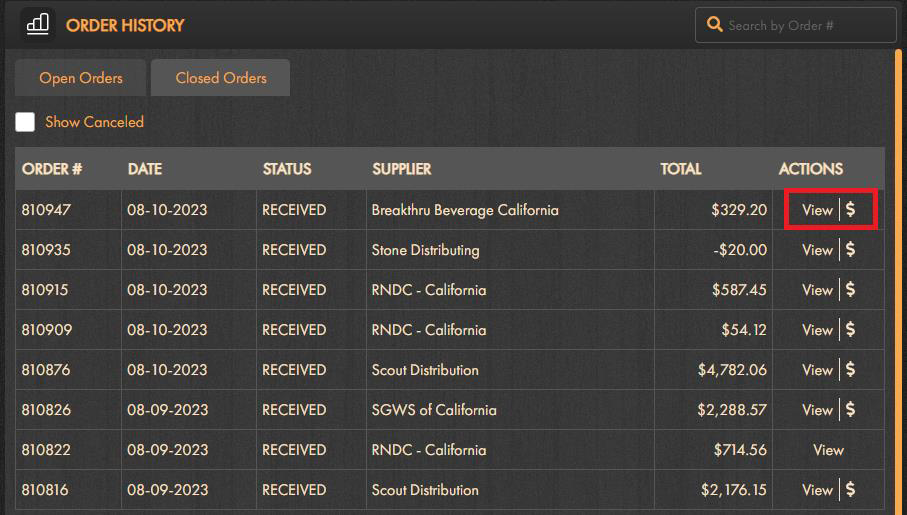
- From the [**Order History** section](https://support.beerboard.com/knowledge/where-can-i-see-my-order-history?hsLang=en), click **Closed Orders** tab to view all closed orders
-png-1.png)
- **Closed Orders** is a list of [completed orders](https://support.beerboard.com/knowledge/closed-orders?hsLang=en)
- Click *Show Canceled* checkbox to review [canceled orders](https://support.beerboard.com/knowledge/canceled-orders?hsLang=en)
- Click *View* to review the completed order
If Canceled is clicked, currently, default sorting is by Status first, in alphabetical order
Sorting by date first is the intended default and will be available in our next release.
- If using SmartOrders Mobile Invoice Capture, view your invoice image by clicking the "$"
- 
- The image can be deleted from the desktop via trach can icon or directly on the app by selecting Delete Image
- All orders in **Closed Order** tab are view only and cannot be edited
-png-1-1.png)
**Action Required tab**
- Alert will appear when placing an order that does not meet [set minimum order value](https://support.beerboard.com/knowledge/setting-up-distributors?hsLang=en)
- Orders placed for multiple distributors will be routed accordingly, and only orders that require additional attention will be Incomplete orders
-png-1.png)
- **Incomplete orders** can be viewed and modified under the **Action Required** tab in the [**Order History** section](https://support.beerboard.com/knowledge/where-can-i-see-my-order-history?hsLang=en)
- This tab will only be visible if incomplete orders are present and require attention
- Click *View* to open the incomplete order and modify
-png-1-1.png)
Adjustments can be made to your order
-png-1.png)
- Modify package size, quantity, price, deposit, discount, and tax
- Click **Add More Products** for quick add to your order
- Click **Update** at any time and **Place Order** when modifications are complete
- Click **Delete** to remove entire incomplete order from your order history
Incomplete orders that are deleted are never sent to the distributor to be ordered. If products are still needed from this distributor, a new order must be placed.
### BeerBoard/SmartOrders P@Y tab
- From the [**Order History** section](https://support.beerboard.com/knowledge/where-can-i-see-my-order-history?hsLang=en), click SmartOrders P@Y tab to view transaction history
Note: This tab is only visible to customers [enrolled with BeerBoard P@Y](https://support.beerboard.com/knowledge/smartorders-pay-signup-retail?hsLang=en)
-png-1.png)
- For targeted date range, use the *Select Date* filter above the transaction overview
- Search by *Order #* in the upper right
- Click *Download XLSX* to export your transaction history with selected date range
- [Bars and Restaurants](https://support.beerboard.com/knowledge/bars-and-restaurants?hsLang=en#main-content)
- [SmartBar](https://support.beerboard.com/knowledge/bars-and-restaurants?hsLang=en#smartbar)
- [Product Management](https://support.beerboard.com/knowledge/bars-and-restaurants?hsLang=en#product-management)
- [Yield Management](https://support.beerboard.com/knowledge/bars-and-restaurants?hsLang=en#yield-management)
- [BeerBoard TV](https://support.beerboard.com/knowledge/bars-and-restaurants?hsLang=en#beerboard-tv)
- [SmartBar Mobile App](https://support.beerboard.com/knowledge/bars-and-restaurants?hsLang=en#smartbar-mobile-app)
- [BeerBoard P@Y](https://support.beerboard.com/knowledge/bars-and-restaurants?hsLang=en#beerboard-py)
- [SmartMenus](https://support.beerboard.com/knowledge/bars-and-restaurants?hsLang=en#smartmenus)
- [SmartOrders](https://support.beerboard.com/knowledge/bars-and-restaurants?hsLang=en#smartorders)
- [Integrations Setup](https://support.beerboard.com/knowledge/bars-and-restaurants?hsLang=en#integrations-setup)
- [New SmartBar](https://support.beerboard.com/knowledge/bars-and-restaurants?hsLang=en#new-smartbar)
- [BevBox](https://support.beerboard.com/knowledge/bars-and-restaurants?hsLang=en#bevbox)
- [Beer Tour](https://support.beerboard.com/knowledge/bars-and-restaurants?hsLang=en#beer-tour)
- [General FAQs](https://support.beerboard.com/knowledge/general-faqs?hsLang=en#main-content)
- [SmartBar](https://support.beerboard.com/knowledge/general-faqs?hsLang=en#smartbar)
- [SmartOrders](https://support.beerboard.com/knowledge/general-faqs?hsLang=en#smartorders)
- [Claim Your Brand](https://support.beerboard.com/knowledge/claim-your-brand?hsLang=en#main-content)
- [Distributors, Wholesalers, and Suppliers](https://support.beerboard.com/knowledge/claim-your-brand?hsLang=en#distributors-wholesalers-and-suppliers)
- [Claim Your Brand FAQs](https://support.beerboard.com/knowledge/claim-your-brand?hsLang=en#claim-your-brand-faqs)
- [Suppliers, Distributors, and Wholesalers](https://support.beerboard.com/knowledge/suppliers-distributors-and-wholesalers?hsLang=en#main-content)
- [SmartOrders](https://support.beerboard.com/knowledge/suppliers-distributors-and-wholesalers?hsLang=en#smartorders)
- [Insights](https://support.beerboard.com/knowledge/suppliers-distributors-and-wholesalers?hsLang=en#insights)
- [General FAQ](https://support.beerboard.com/knowledge/suppliers-distributors-and-wholesalers?hsLang=en#general-faq)
- [BeerBoard P@Y](https://support.beerboard.com/knowledge/suppliers-distributors-and-wholesalers?hsLang=en#beerboard-py)
[](https://www.beerboard.com/)
225 W Jefferson St, Syracuse, NY 13202
Copyright © 2025, BeerBoard
```json
{
"@context" : "https://schema.org",
"@type" : "VideoObject",
"contentUrl" : "https://6513525.fs1.hubspotusercontent-na1.net/hubfs/6513525/Training%20Department/Training%20Videos/Open%20&%20Closed%20Orders%20Overview.mp4",
"dateModified" : "2023-02-02T16:45:11.336Z",
"duration" : "PT1M30.934S",
"height" : 820,
"name" : "Open & Closed Orders Overview",
"thumbnailUrl" : "https://6513525.fs1.hubspotusercontent-na1.net/hubfs/6513525/Training%20Department/Training%20Videos/Open%20&%20Closed%20Orders%20Overview.mp4/medium.jpg",
"uploadDate" : "2022-12-19T22:08:51.408Z",
"width" : 1440
}
```