---
title: Winking Lizard Beer Tour - User Guide
description: Beer Tour
---
[Skip to content](https://support.beerboard.com/knowledge/beer-tour-mobile-app#main-content)
English
Show submenu for translations
Open main navigation
Close main navigation
- English
Show submenu for translations
- [Contact us](https://share.hsforms.com/1b6jKgzmvTI-oms75xoTasw3vlv9)
[Contact us](https://share.hsforms.com/1b6jKgzmvTI-oms75xoTasw3vlv9)
How can we help you?
- There are no suggestions because the search field is empty.
1. [BeerBoard Knowledge Base](https://support.beerboard.com/knowledge?hsLang=en)
2. [Bars and Restaurants](https://support.beerboard.com/knowledge/bars-and-restaurants?hsLang=en)
3. [Beer Tour](https://support.beerboard.com/knowledge/bars-and-restaurants?hsLang=en#beer-tour)
# Winking Lizard Beer Tour - User Guide
Welcome to the Winking Lizard Beer Tour! This guide will help you get started on your beer adventure and make the most of your tour experience.
#### Getting Started
### Creating Your Account
1. Download the Winking Lizard Beer Tour mobile app for iOS and Android (ADD LINK WHEN LIVE)
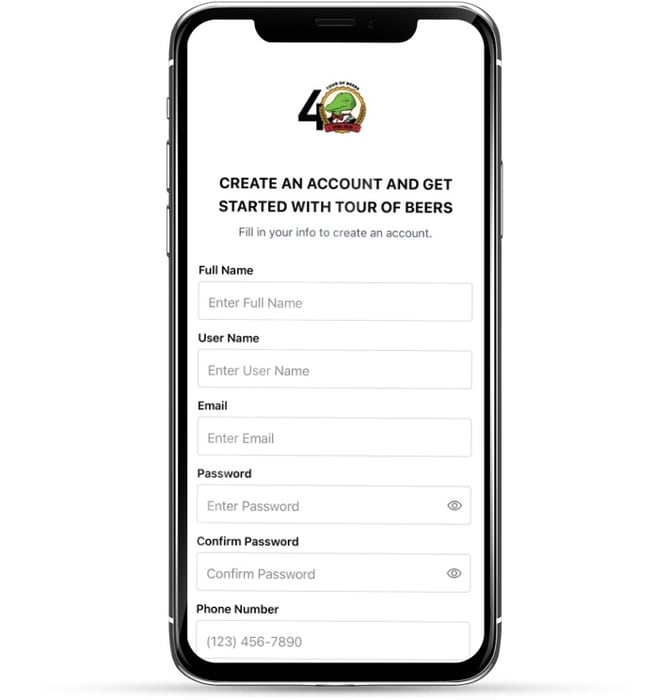
2. Tap "Sign Up" to create your account 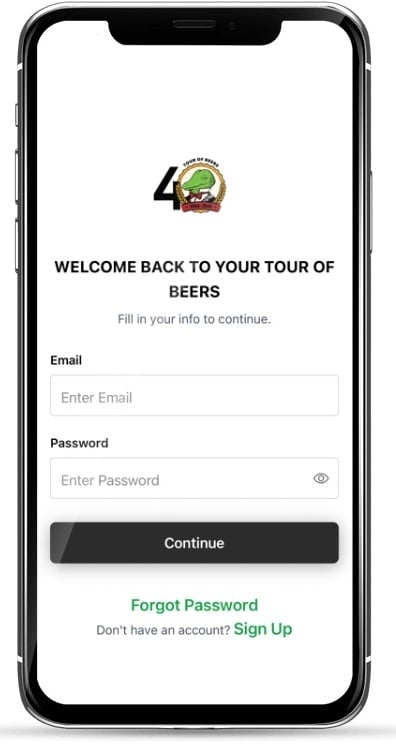
3. Enter your information:
- Full name
- Email address
- Password
- Phone number
4\. Verify your account by clicking the account verification link sent via email
5\. You're ready to start your tour!
### Logging In
Already have an account? Simply:
1. Enter your email address and password
2. Start exploring!
#### Understanding the Beer Tour
### What is a Tour?
The Winking Lizard Beer Tour is your passport to exploring amazing beers across all Winking Lizard locations. Here's how it works:
- **Trip**: A collection of 25 unique beers
- **Tour**: The complete list of all unique beers available
- **Points**: Earned for each beer you try (values may vary by beer)
You can complete as many trips as you like by drinking the same 25 unique beers repeatedly, earning points each time!
### Beer Availability
While the tour is the same across all Winking Lizard locations, each restaurant has different beers in stock. The app will show you which tour beers are available at your current location.
### Using the App
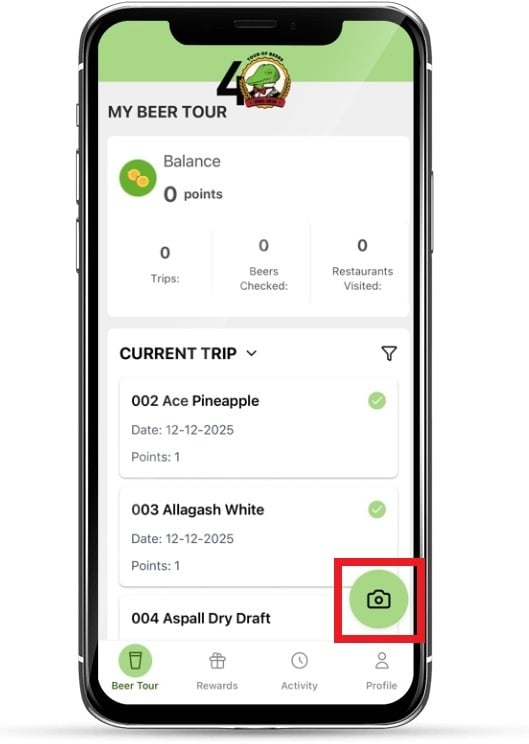
#### Home Screen - Beer Tour
Your home screen shows:
- **Points Balance**: Your total points earned
- **Trip Count**: Number of 25-beer trips completed
- **Unique Beers**: Total different beers you've tried on the tour
- **Restaurants Visited**: How many locations you've explored
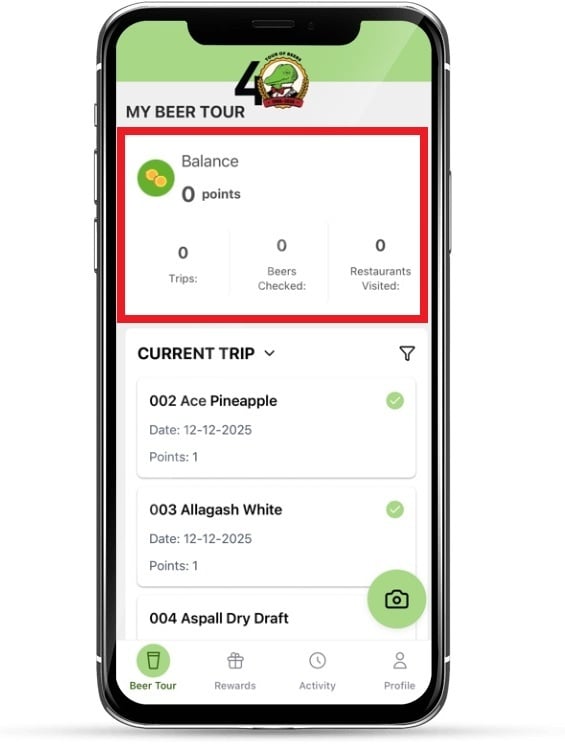
**Your Beer List** displays:
- Beer name
- Completion status (claimed or unclaimed)
- Date completed
- Your rating, once you've tried it (Ratings coming in 2026)
**Filters** help you find beers:
- Claimed/Unclaimed
- Available at your current location
- All completed beers
### Capturing Your Beers
After enjoying a tour beer, capture your receipt by tapping the camera icon and taking a photo:
**Important**: Your first receipt must include the tour sign-up fee to activate your account.
#### Rating Beers
Once you've tried a beer, you can rate it 1-5 stars! Your ratings help other beer enthusiasts discover great options. You'll see the community's average rating for each beer in the app.
### **Rewards**
#### Earning Rewards
Points accumulate with every tour beer you drink. Different beers may be worth different points, and special promotional periods may offer bonus points!
**Note**: Points are locked at the value when you earned them, so promotional changes won't affect your past purchases.
### Redeeming Rewards
1. Tap the "Rewards" menu at the bottom
2. Browse available rewards in the Rewards Store
3. Select items you'd like to redeem (within your points balance)
4. Tap "Redeem X items"
5. Confirm your selection
Your rewards will be sent to your Home Location for pickup. When ready, you'll receive a notification and a unique pickup code.
**Tip**: Consider saving points for bigger rewards! You'll see a reminder when redeeming.
### Picking Up Rewards
1. Wait for notification that your reward is ready
2. Visit your Home Location
3. Show your pickup code to the manager or server
4. Enjoy your reward!
You can view all pending and claimed rewards under "My Rewards."
#### Activity
Track your beer tour journey in the Activity section:
- View all transactions
- See which beers you claimed at each visit
- Check location and store details
- Review transaction dates
#### Your Profile
Update your information anytime:
- Change your Home Location
- Update email or phone number
- Adjust communication preferences
- Contact support
#### Need Help?
### Customer Support
Have questions? Tap "Contact Support" in your Profile or Activity section to reach out to the Winking Lizard team. They're here to help!
### Tips for Success
- **Keep your receipts** until your beers are confirmed in the app
- **Update your location** to see which tour beers are available where you're dining
- **Rate beers** to help fellow beer lovers discover favorites
- **Check for promotions** - point values may increase during special periods
- **Visit different locations** to try beers that are only available at certain restaurants
#### Special Features
### Location-Based Filtering
The app uses your location to show you which tour beers are available at your current Winking Lizard. This helps you plan what to try during your visit!
### Beer Suggestions
Servers can print a personalized list showing:
- All the beers you've completed
- Beers available only at that location that you haven't tried yet
Just ask your server for a printout using your phone number!
### Multiple Tours
Complete your first 25 unique beers, then start another trip! There's no limit to how many trips you can complete.
---
#### Frequently Asked Questions
**Q: What if I change my phone number or email?**
A: Update directly in the mobile app or visit a manager at any Winking Lizard location to update your contact information.
**Q: Can multiple people share a check?**
A: Yes! Each person on the tour can claim their beers from a shared receipt.
**Q: What happens if I order the same beer twice on one check?**
A: You'll receive points once per unique beer per visit.
**Q: Can I use the tour at any Winking Lizard location?**
A: Absolutely! The tour works at all Winking Lizard restaurants.
**Q: How do I know which beers are worth more points?**
A: Point values are shown next to each beer in your tour list.
**Q: What if my reward is out of stock?**
A: Your points will be refunded, and you can choose something else.
---
Start your Winking Lizard Beer Tour adventure today and explore amazing beers while earning great rewards!
*For questions related to the 2026 Beer Tour, contact the Winking Lizard team through the app!*
- [Bars and Restaurants](https://support.beerboard.com/knowledge/bars-and-restaurants?hsLang=en#main-content)
- [SmartBar](https://support.beerboard.com/knowledge/bars-and-restaurants?hsLang=en#smartbar)
- [Product Management](https://support.beerboard.com/knowledge/bars-and-restaurants?hsLang=en#product-management)
- [Yield Management](https://support.beerboard.com/knowledge/bars-and-restaurants?hsLang=en#yield-management)
- [BeerBoard TV](https://support.beerboard.com/knowledge/bars-and-restaurants?hsLang=en#beerboard-tv)
- [SmartBar Mobile App](https://support.beerboard.com/knowledge/bars-and-restaurants?hsLang=en#smartbar-mobile-app)
- [BeerBoard P@Y](https://support.beerboard.com/knowledge/bars-and-restaurants?hsLang=en#beerboard-py)
- [SmartMenus](https://support.beerboard.com/knowledge/bars-and-restaurants?hsLang=en#smartmenus)
- [SmartOrders](https://support.beerboard.com/knowledge/bars-and-restaurants?hsLang=en#smartorders)
- [Integrations Setup](https://support.beerboard.com/knowledge/bars-and-restaurants?hsLang=en#integrations-setup)
- [New SmartBar](https://support.beerboard.com/knowledge/bars-and-restaurants?hsLang=en#new-smartbar)
- [BevBox](https://support.beerboard.com/knowledge/bars-and-restaurants?hsLang=en#bevbox)
- [Beer Tour](https://support.beerboard.com/knowledge/bars-and-restaurants?hsLang=en#beer-tour)
- [General FAQs](https://support.beerboard.com/knowledge/general-faqs?hsLang=en#main-content)
- [SmartBar](https://support.beerboard.com/knowledge/general-faqs?hsLang=en#smartbar)
- [SmartOrders](https://support.beerboard.com/knowledge/general-faqs?hsLang=en#smartorders)
- [Claim Your Brand](https://support.beerboard.com/knowledge/claim-your-brand?hsLang=en#main-content)
- [Distributors, Wholesalers, and Suppliers](https://support.beerboard.com/knowledge/claim-your-brand?hsLang=en#distributors-wholesalers-and-suppliers)
- [Claim Your Brand FAQs](https://support.beerboard.com/knowledge/claim-your-brand?hsLang=en#claim-your-brand-faqs)
- [Suppliers, Distributors, and Wholesalers](https://support.beerboard.com/knowledge/suppliers-distributors-and-wholesalers?hsLang=en#main-content)
- [SmartOrders](https://support.beerboard.com/knowledge/suppliers-distributors-and-wholesalers?hsLang=en#smartorders)
- [Insights](https://support.beerboard.com/knowledge/suppliers-distributors-and-wholesalers?hsLang=en#insights)
- [General FAQ](https://support.beerboard.com/knowledge/suppliers-distributors-and-wholesalers?hsLang=en#general-faq)
- [BeerBoard P@Y](https://support.beerboard.com/knowledge/suppliers-distributors-and-wholesalers?hsLang=en#beerboard-py)
[](https://www.beerboard.com/)
225 W Jefferson St, Syracuse, NY 13202
Copyright © 2025, BeerBoard